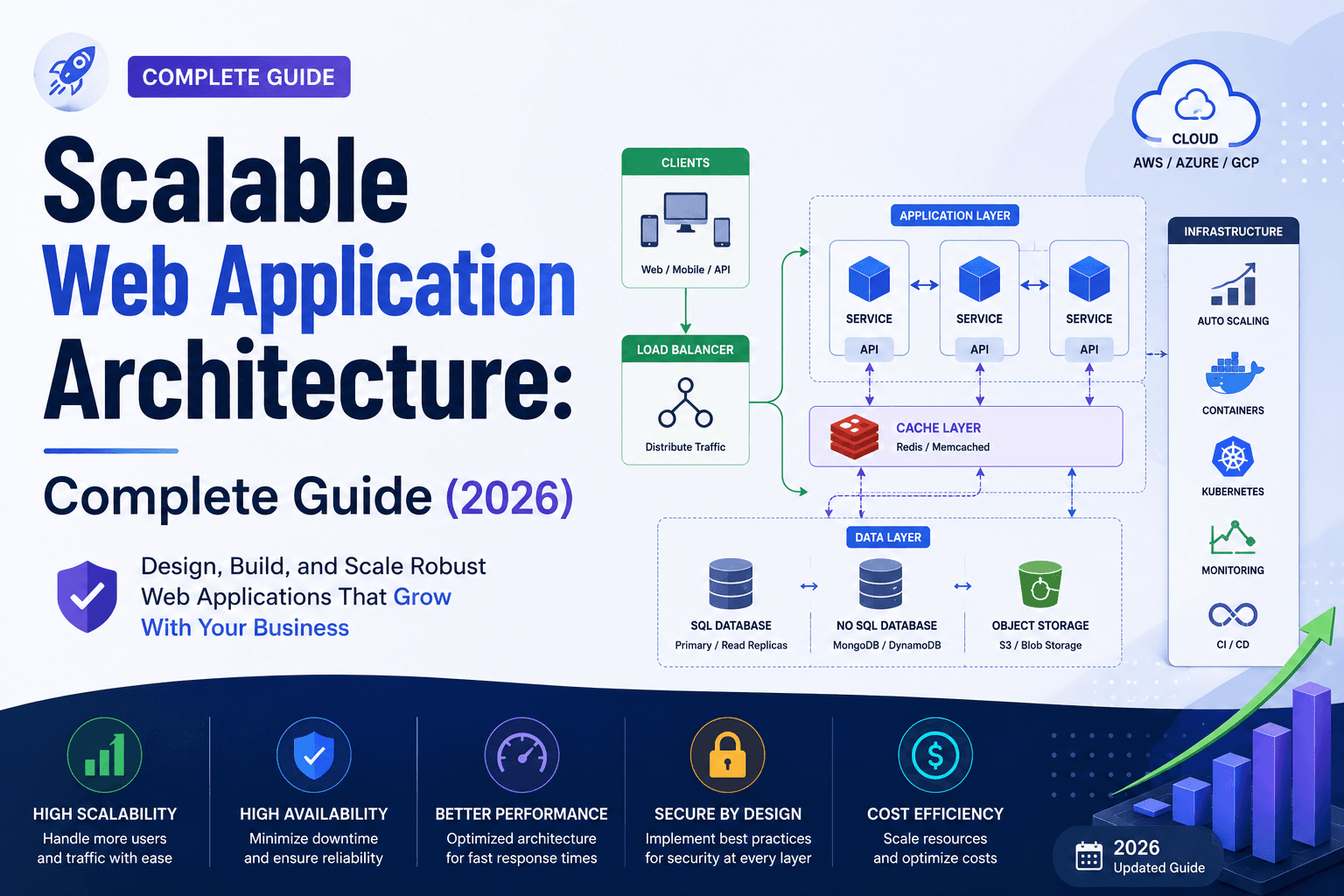
Scalable Web Application Architecture for Growing Businesses
Your web application works perfectly with 500 users. Then a product launch lands, a campaign goes viral, or you win a major contract and suddenly 50,000 users hit your platform in a single afternoon. The servers struggle. Pages time out. Customers leave. Revenue disappears.
This is not a traffic problem. It is an architecture problem. And it was baked into the system long before a single user signed up.
Scalable web application architecture is the difference between a platform that grows with your business and one that becomes a liability the moment growth arrives. This guide explains what it is, why it matters, and how to build it — with real examples from businesses that got it right, and some that did not.
The Architecture Truth Most Developers Do Not Tell You: A fast application and a scalable application are not the same thing. Your platform can load in under 2 seconds for 100 users and completely collapse under 10,000. Speed is performance. Scalability is the ability to maintain that performance as demand grows. Both matter. Most builds optimise for one and ignore the other.
What Is Web Application Architecture?
Web application architecture is the structural blueprint of how the different components of a web application — servers, databases, APIs, user interfaces, and third-party services — are organised and communicate with each other.
Think of it as the floor plan of a building. You can build a house that comfortably fits a family of four. But if you need to accommodate 400 people, you do not just add more chairs. You need a fundamentally different structure — wider corridors, multiple entry points, distributed load-bearing walls, separate utilities for different zones.
The core components of web application architecture include:
- Frontend (Client Layer): The interface users interact with — browsers, mobile apps, single-page applications
- Backend (Application Layer): The server-side logic that processes requests and returns responses
- Database Layer: Where data is stored, retrieved, and managed
- APIs: The communication channels between components and third-party services
- Infrastructure Layer: The servers, cloud services, and networking that host everything
How these components connect — and how independently they can operate — determines whether your architecture scales or breaks.
What Makes Web Application Architecture Scalable?
Scalable web application architecture is a system designed to handle increasing workloads — more users, more data, more transactions — by adding resources efficiently, without requiring a complete rebuild.
For a definition that answers the core search question directly: scalable web application architecture is a structural approach that allows a platform to grow in capacity and performance proportionally with demand, by distributing workload across independent, loosely coupled components that can be scaled individually.
The key word is proportionally. A scalable system does not just survive traffic spikes — it handles them without performance degradation, and does so without multiplying costs at the same rate as growth.
The four axes of scalability in 2026:
| Axis | What It Means | Example |
|---|---|---|
| Vertical (Scale Up) | Add more power to existing servers (CPU, RAM) | Upgrading a single database server |
| Horizontal (Scale Out) | Add more servers to share the load | Adding application servers behind a load balancer |
| Diagonal (Scale Deep) | Optimise code and queries to do more with less | Reducing database queries from 42 to 4 per page load |
| Scale to Zero (Serverless) | Components spin up on demand and shut down completely when idle | AWS Lambda functions that cost $0 when not in use |
True enterprise-grade scalability combines all four — but horizontal scaling is the foundation, and Scale to Zero is the 2026 cost efficiency layer that makes elastic infrastructure viable for businesses of every size.
What Is the Difference Between Scalable and Non-Scalable Architecture?
The difference between scalable and non-scalable architecture is not always visible when a system is small. It becomes catastrophically obvious when demand spikes.
| Factor | Non-Scalable Architecture | Scalable Architecture |
|---|---|---|
| State Management | Local disk or server memory | Shared Redis / JWT tokens |
| Database | Single primary handles everything | Primary + read replicas + caching |
| Traffic handling | Fixed capacity — overloads under spikes | Smart load balancer / WAF distributes load |
| Heavy Tasks | Run synchronously on main thread | Async message queues |
| Deployment | "Big Bang" — risk of total failure | Canary / Blue-Green deployment |
| Failure behaviour | One failure crashes everything | Failures are isolated; the rest continues |
| Cost under growth | Costs spike exponentially | Costs scale linearly with usage |
| Traffic Control | None — direct to server | Load balancer with health checks |
Real-world illustration: A non-scalable architecture is like a single-lane road. It handles normal traffic fine. Add one unexpected event — a concert, a crash, a detour — and the entire road system locks up. A scalable architecture is a motorway: multiple lanes, entry and exit points, the ability to open additional lanes under demand.
Business-critical failure example: In 2021, a major Australian ticketing platform crashed within minutes of releasing tickets for a popular event. 200,000 users hit the system simultaneously. The single-server architecture, adequate for daily traffic, had no horizontal scaling, no queue management, and no load balancing. The event sold out chaotically — but the platform's reputation did not recover cleanly. A properly scaled architecture would have queued users, distributed load across servers, and served every request without downtime.
Scalable vs Non-Scalable: The Architecture Breakdown
Monolithic Architecture — The Swiss Army Knife
A monolith is one tool with many blades. The entire application — frontend rendering, backend logic, payment processing, user authentication, email sending — is built and deployed as a single unit. Every blade lives in the same handle.
Characteristics:
- Simple to build and test in the early stages
- Every component shares the same codebase and deployment pipeline
- Scaling requires replicating the entire application, even if only one component is under load
- A single bug in any blade can cause the whole knife to fail
- As the team grows, multiple developers working on the same codebase start blocking each other
When it works: Early-stage startups, internal tools, MVPs that need to ship fast.
When it breaks: When user growth accelerates, teams expand, or individual components need different scaling strategies.
Microservices Architecture — The Professional Tool Belt
Microservices break the application into separate, independent tools. Each tool on the belt — payments, authentication, inventory, notifications — is its own deployable service. A broken payment service does not affect the inventory service. You replace one tool without touching the others.
Characteristics:
- Each service scales independently based on actual demand
- Teams deploy independently, with no risk of blocking each other
- Technology choices can differ per service
- Requires sophisticated infrastructure and operational discipline to manage effectively
- Can introduce significant overhead for lean teams
When it works: Growth-stage SaaS, high-volume eCommerce, platforms where different components have very different traffic patterns.
The Pragmatic Middle Ground for 2026: Modular Monolith Most growth-stage businesses do not need full microservices on day one. A modular monolith is the smart starting point: a single codebase with clearly defined internal boundaries between components, deploying as one unit but structured so that individual modules can be extracted into independent microservices when genuine scale demands it. You get the simplicity of a monolith now, with the migration path to microservices already built in — at a fraction of the operational overhead.
What Are the Key Considerations When Designing Scalable Architecture?
1. Design for Statelessness — The Non-Negotiable Foundation
What it means: Application servers must not store any user-specific data locally. Session data, authentication tokens, and user state must be stored in a centralised shared layer that any server can access.
Why it is the most common reason auto-scaling fails: If a user's session is stored on Server A and Server A goes down, the user loses their session. Worse, when Server B is added to handle load, it has no knowledge of Server A's sessions — users are randomly logged out. Stateless servers mean any server can handle any request at any time. That is what makes horizontal scaling physically possible.
The 2026 enforcement standard: In production-grade architectures, statelessness is enforced through one of two patterns:
- JWT (JSON Web Tokens): Authentication state is encoded in a cryptographically signed token that the client holds and presents with every request. No server-side session storage required. Server #1 and Server #100 are completely interchangeable.
- Centralised Redis Sessions: Session data is stored in a shared Redis instance accessible by every application server. Any server can handle any user's request instantly.
Real example: A SaaS platform grew from 5,000 to 80,000 active users over 18 months. Because sessions were stored in local server memory, adding new servers to handle load did not work. New servers meant new users were distributed across servers that had no knowledge of existing sessions — resulting in widespread random logouts during peak periods. The fix required a full architectural refactor under pressure. A stateless architecture from the start would have avoided this entirely.
2. Multi-Layer Caching — Your First Line of Defence Against Traffic Spikes
The caching hierarchy from closest to furthest from the user:
- Browser Cache: Static assets (images, CSS, JS) stored locally. Eliminates the request entirely.
- CDN / Edge Cache: Content distributed globally. Static pages served from the nearest edge node, not your origin server.
- Application Cache (Redis / Memcached): Frequently accessed database queries and API responses stored in memory.
- Database Query Cache: Repeated identical queries served from memory without hitting the database engine.
Each layer eliminates an entire class of load from the layer below it. Without browser caching, every user requests every image, every time. Without CDN, every request hits your origin. Without application cache, every request hits your database. Without database query cache, every identical query is processed fresh.
2026 Best Practice — Edge Functions: Edge computing has matured significantly. Instead of serving cached static pages, Edge Functions now allow you to run dynamic business logic at CDN edge nodes — authentication checks, personalisation, A/B testing — without a round trip to the origin server. The result is sub-50ms response times globally for authenticated requests that previously required 200-400ms origin round trips.
3. Database Scaling — The Most Commonly Neglected Layer
Databases are where scalability goes to die. Most architectural failures at scale originate at the database layer, and most teams do not address it until it is already causing problems.
The read/write split: Most application workloads are 80/20 or 90/10 read-heavy. A primary database handles all writes. One or more read replicas handle reads. The application routes queries accordingly. This alone can support 5-10x your single-primary capacity without touching the primary database at all.
Caching as a load shield: Before optimising the database itself, cache aggressively. A well-tuned application cache absorbs 60-80% of read queries entirely. This reduces database load to the writes and the remaining reads that genuinely require fresh data.
Connection pooling: Database connections are expensive. Each new connection consumes memory and CPU on the database server. Connection pooling (via PgBouncer for PostgreSQL, or equivalent tools for other databases) allows hundreds of application instances to share a smaller pool of database connections efficiently. This is non-negotiable at scale.
4. Async Processing — Remove Heavy Lifting from the Critical Path
Any operation that does not need to complete before the user sees a response should not run synchronously. Email sending, report generation, image processing, third-party API calls with no time constraint — all of these belong in a message queue.
How it works: When a user submits a request that triggers a heavy operation, the application immediately acknowledges the request and places the operation in a queue. A separate pool of worker processes handles queue items in the background. The user gets an immediate response. The work completes asynchronously.
The business impact: A user submitting an order does not need to wait for the confirmation email to be sent before they see the success page. A user uploading a profile photo does not need to wait for thumbnail generation, watermarking, and CDN propagation before their upload completes. Async processing removes the entire class of user-perceived latency caused by synchronous heavy tasks — and eliminates the cascading timeouts that follow.
5. Auto-Scaling Architecture — Infrastructure That Grows With Demand
Auto-scaling is the mechanism that translates your architectural decisions into real-time capacity management. Without it, you are manually provisioning servers based on predictions — which means either over-provisioning and wasting money, or under-provisioning and experiencing outages.
Horizontal auto-scaling: When CPU usage exceeds 70% across your application servers for 3 consecutive minutes, spin up 2 additional instances. When usage drops below 30% for 10 minutes, terminate excess instances. This is the foundational pattern.
Scale to Zero: The 2026 maturity benchmark. Traditional auto-scaling still runs instances at zero capacity utilization — you pay for idle servers. Scale to Zero serverless components (AWS Lambda, Azure Functions, Google Cloud Functions) spin down completely when not in use, and spin up in milliseconds when traffic arrives. You pay only for actual execution time.
Real example: An Australian eCommerce platform with seasonal traffic patterns (Christmas peaks, EOFY surges, flash sale spikes) migrated their product search, recommendation engine, and email processing to Scale to Zero serverless functions. During quiet periods, these components cost nothing. During peak periods, they handled 8x normal traffic without any manual intervention or pre-provisioning. The annual infrastructure cost dropped 40% compared to always-on servers sized for peak load.
6. Observability — You Cannot Scale What You Cannot Measure
Observability is the ability to understand what is happening inside your system from the outside. Without it, you cannot diagnose performance problems, identify bottlenecks, or verify that your scaling mechanisms are working correctly.
The three pillars:
- Metrics: CPU usage, memory, request latency, error rates, throughput. Aggregated and visualised in dashboards (Grafana, Datadog).
- Logs: Structured application logs from every service, shipped to a central location (Elasticsearch, Loki, CloudWatch).
- Traces: The complete journey of a request across multiple services. Essential for diagnosing latency in distributed systems. (Jaeger, Zipkin, OpenTelemetry).
2026 Standard — OpenTelemetry: The industry has converged on OpenTelemetry as the vendor-neutral standard for observability instrumentation. It provides a unified approach to collecting metrics, logs, and traces across every component in your stack — from the frontend to the database. This portability means you are not locked into a specific observability vendor as your architecture evolves.
The Scalable Architecture Blueprint — Putting It All Together
A production-grade scalable architecture in 2026 combines all six principles into a coherent system:
Users enter through a CDN with Edge Functions handling authentication, personalisation, and static content delivery at sub-50ms globally. Dynamic requests hit load-balanced application servers running as stateless containers or serverless functions, distributing load automatically based on real-time demand. Database access routes through a connection pool to a primary/replica cluster with aggressive query caching. All heavy asynchronous operations — emails, reports, media processing, third-party API calls — are queued in a message broker and processed by dedicated worker pools. The entire system auto-scales horizontally based on real-time metrics, with serverless components spinning down to zero when idle. Every component emits metrics, logs, and traces via OpenTelemetry to a unified observability platform.
The result is a system that performs consistently at 500 users and at 500,000 users.
For businesses building custom platforms, our custom web application development guide covers the full development process in detail. To understand the architecture decisions that separate custom builds from templates, see our custom website vs templates comparison. Explore our custom web development services to see how The Development architects scalable platforms for Australian businesses.